Choosing the best audio interface for music production in 2026 starts with a surprisingly simple question: how many things do you actually need plugged in at the same time?
If you record one microphone and one instrument, a compact interface may be everything you need. If most of your studio communicates through MIDI or audio over USB, your analog input requirements may also stay relatively small.
But if your studio includes multiple synthesizers, drum machines, microphones, outboard effects, monitor pairs or modular gear, two inputs disappear very quickly. A stereo synthesizer alone usually takes two line inputs. Add a drum machine, microphone and another synth, and suddenly keeping everything connected becomes part of the creative workflow.
That is why there is no universal best audio interface. The right interface depends on your studio, how you make music, how much you want connected at once and how much room you need to grow.
Bigger is not automatically better. Most of the manufacturers in this guide also make smaller interfaces with one or two microphone preamps. If you love what RME, SSL, Universal Audio, Arturia or MOTU are doing but only record one or two sources at a time, you may be better served by a smaller model from the same ecosystem.
This guide compares some of the best audio interfaces available at Moog Audio, from compact home studio options to expandable professional systems with ADAT, MIDI, multiple preamps and large I/O counts.
Quick Picks: Best Audio Interfaces for Music Production in 2026
Prices below are in CAD and were checked in October 2026. Pricing and availability can change, and sale prices are marked where applicable.
| Audio Interface | I/O | Resolution | ADAT | MIDI I/O | Price | Best For |
|---|---|---|---|---|---|---|
| SSL 2+ MKII | 2-in / 4-out | 32-bit / 192 kHz | No | 1 In / 1 Out, 5-pin DIN | $359 sale | Compact studios and high-quality 2-channel recording |
| Yamaha URX22 | 4-in / 2-out | 32-bit / 192 kHz | No | No dedicated MIDI I/O | $519.99 | Music, streaming and creator workflows |
| Universal Audio Volt Max | Up to 12-in / 6-out | 32-bit / 192 kHz | Yes | 1 In / 1 Out, 3.5 mm TRS Type A | From $419 | Desktop production with onboard tone shaping and compression |
| MOTU UltraLite mk5 | 18-in / 22-out | 24-bit / 192 kHz | 8-channel optical I/O | 1 In / 1 Out, 5-pin DIN | $965 | Synth-heavy studios and portable/live rigs |
| Arturia AudioFuse 16Rig | 32-in / 28-out total at 48 kHz | 24-bit / 192 kHz | Up to 16 channels I/O | 1 In / 2 Out-Thru, 5-pin DIN + USB MIDI host | $1,699.99 | Large synth setups, DAWless studios and standalone routing |
| SSL 18 | 26-in / 28-out | 32-bit / 192 kHz | 16 channels | 1 In / 1 Out, 3.5 mm TRS Type A | $1,419 sale | Expandable rack studios and multi-mic recording |
| RME Fireface UFX III | Up to 94-in / 94-out | 24-bit / 192 kHz | Dual ADAT plus MADI, AES and more | 2 x MIDI In / Out, 5-pin DIN | $4,525 | Professional multichannel studios |
How Many Inputs and Outputs Do You Actually Need?
Before comparing preamps, converters, plug-ins or glowing meters, count your connections.
One microphone = one input.
One mono synth = one input.
One stereo synth = two inputs.
One stereo drum machine = two inputs.
If you only record one or two sources at a time, you may be better served by a high-quality compact interface than by paying for 20 channels you will never use.
On the other hand, electronic musicians often discover that their studio grows faster than expected. If you want your synthesizers and drum machines permanently connected so you can press record without repatching cables, an audio interface with multiple inputs starts making much more sense.
Outputs matter too. Extra outputs can feed multiple monitor pairs, headphone mixes, outboard effects, external mixers, modular systems or larger monitoring setups.
And pay attention to what manufacturers mean by total I/O. An interface advertised as “26-in / 28-out” does not necessarily have 26 analog sockets. Those numbers can include analog connections, ADAT, S/PDIF, MADI and other digital formats.
Do You Need ADAT?
If you think your studio might expand, ADAT is one of the most useful features to look for.
An audio interface with ADAT can connect to an external multi-channel preamp or converter, allowing you to add more inputs or outputs without replacing your main interface.
This is particularly useful for producers with multiple synthesizers, bands, drum recording setups and hardware-heavy studios.
Keep in mind that available ADAT channel counts can decrease at higher sample rates. If you regularly work at 96 kHz or 192 kHz, check the high-sample-rate digital I/O configuration before buying.
Do You Need MIDI?
Do you want to be able to play MIDI instruments that need a 5-pin DIN connection? Or do you simply want to have USB MIDI and that feature doesn't matter?
If most of your controllers, synthesizers and drum machines already connect directly to your computer over USB, dedicated MIDI ports on the audio interface may not be essential. But physical MIDI I/O can make a hardware setup much cleaner, especially if you want the interface itself to act as the bridge between your DAW and older synthesizers, drum machines, sequencers or other MIDI hardware.
It is also worth checking the connector type. Some interfaces use traditional 5-pin DIN MIDI ports, while others use smaller 3.5 mm TRS MIDI connections that require a compatible Type A, or Type B, or Type A/B cable or adapter. Yes these are 3 different types of cables.
For hardware-heavy setups, the AudioFuse 16Rig is particularly flexible because it includes traditional 5-pin DIN MIDI, two MIDI outputs/thru connections and a dedicated USB MIDI host port that can work with class-compliant USB MIDI devices even in standalone mode.
1. SSL 2+ MKII: Best Compact Audio Interface for Music Production

If you only need to record one or two things at a time, the SSL 2+ MKII is a very strong argument for keeping your setup simple.
It gives you two SSL-designed microphone preamps, 32-bit / 192 kHz conversion, two independent headphone outputs and four balanced line outputs in a compact USB-C interface.
Each input also includes SSL's selectable Legacy 4K analogue enhancement, designed to add harmonic character and a subtle high-frequency lift inspired by the company's 4000-series consoles.
For electronic musicians, another useful detail is that the outputs are DC-coupled, so they can be used to send control voltage to compatible synthesizers and modular systems.
MIDI I/O: One MIDI input and one MIDI output using traditional 5-pin DIN connectors.
This is the kind of interface that makes sense when you care about recording quality but do not need an entire rack of inputs permanently connected.
Best for: home studios, producers, vocalists, instrumentalists and electronic musicians recording one or two sources at a time.
Explore the SSL 2+ MKII at Moog Audio →
2. Yamaha URX22: Best Audio Interface for Music, Streaming and Content Creation

The new Yamaha URX22 takes a very different approach to the traditional “box with two gain knobs” interface.
It combines 32-bit / 192 kHz conversion with two XLR/TRS mic, line and Hi-Z inputs, onboard DSP, dual headphone outputs and a touchscreen-based workflow.
Its built-in processing includes gate, compression, EQ, reverb, amp simulation and pitch correction, while Auto Gain and Clip Safe are designed to simplify level setting.
The URX22 also includes dual USB-C connectivity. One connection can handle the main multi-track computer workflow while a second device can operate at the same time, making it particularly interesting for musicians whose work overlaps with streaming, video, podcasting or collaborative content creation.
MIDI I/O: No dedicated MIDI input or output on the URX22. USB MIDI instruments and controllers can still connect directly to your computer as part of the same studio setup.
This is less about building a giant synth wall and more about creating a compact production hub that handles several modern creative jobs without requiring a stack of separate devices.
Best for: musicians, streamers, podcasters and hybrid creators who want studio recording and content-production tools in one interface.
Explore the Yamaha URX22 at Moog Audio →
3. Universal Audio Volt Max: Best New Audio Interface Range for Built-In Tone and Compression

The new Universal Audio Volt Max range is one of the 2026 launches we especially wanted to highlight.
The Volt Max interfaces use 32-bit / 192 kHz conversion and Universal Audio's new Tone Shaping Preamps, with Warmth, Focus and Shine modes for changing the character of a recording on the way in.
Volt Max goes further by adding Max Processing, with onboard compressor presets designed for sources such as vocals, guitar and bass.
Depending on the model, you also get ADAT or S/PDIF optical expansion, MIDI, a built-in talkback microphone, dual headphone outputs, Auto-Gain, Clip Protection, Smart Display and speaker switching.
The lineup gives you several ways to scale:
- Volt 2 Max: 10-in / 4-out with two microphone preamps.
- Volt 4 Max: 12-in / 6-out with two microphone preamps and alternate speaker switching.
- Volt 4P Max: 12-in / 6-out with four microphone preamps.
MIDI I/O: MIDI In and Out via 3.5 mm TRS Type A mini-jacks on the Volt Max models.
The clever part is that this is still desktop-interface territory. You can get digital expansion, two headphone outputs, talkback and onboard compression without immediately moving into a large rackmount system.
Best for: vocalists, instrumentalists, collaborative studios and producers who want a compact interface with hands-on tone shaping, compression and room to expand.
Explore Universal Audio Volt Gen 2 and Volt Max at Moog Audio →
4. MOTU UltraLite mk5: Best Portable Audio Interface for Synths and Live Rigs
This is where things get more interesting for electronic musicians.
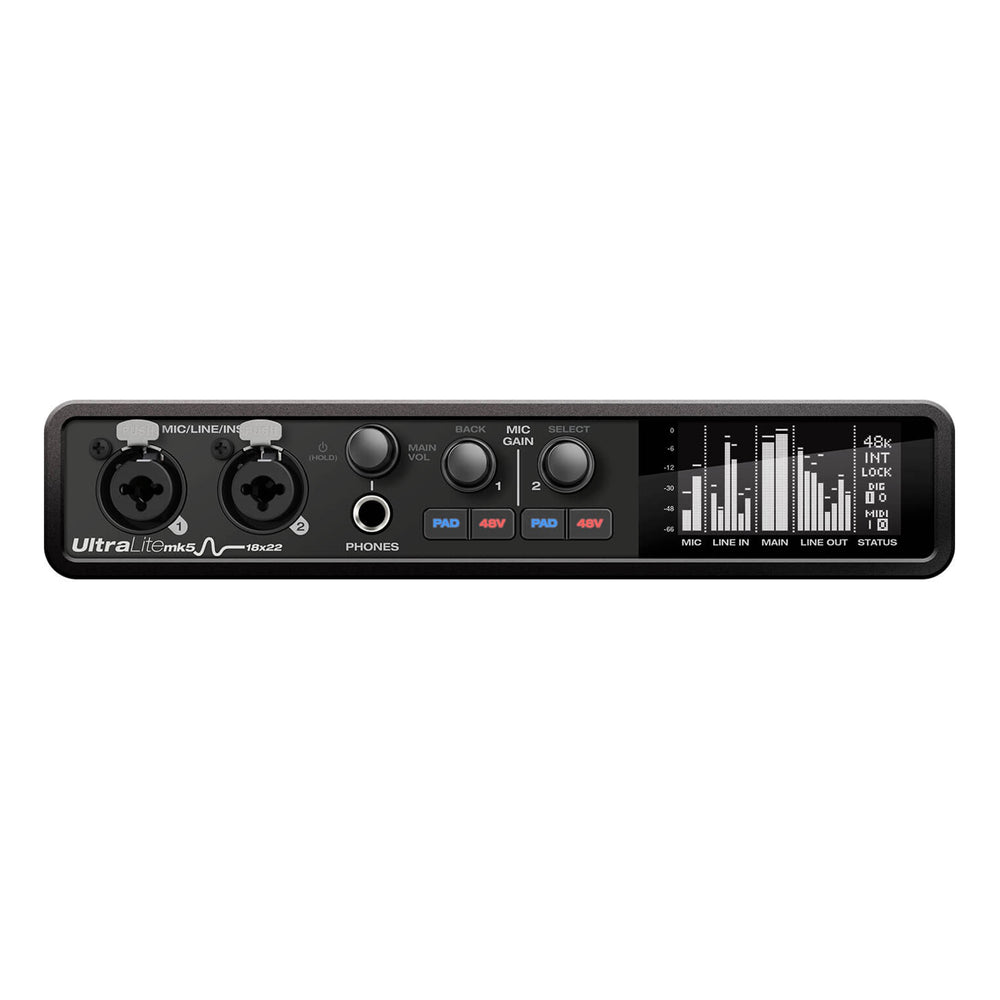
The MOTU UltraLite mk5 provides 18 inputs and 22 outputs in a compact desktop format.
You get two mic, line and instrument combo inputs, six additional balanced line inputs, ten balanced line outputs, S/PDIF, 8-channel optical I/O and traditional MIDI.
That combination makes it especially useful as an audio interface for electronic music. Several synths can stay connected, while the large output count gives you room for hardware effects, alternate monitor paths, external mixing or other routing experiments.
The ten line outputs are also DC-coupled, which can be useful when integrating modular or CV-capable equipment.
MIDI I/O: One MIDI input and one MIDI output using traditional 5-pin DIN connectors.
It is compact enough to travel, supports standalone mixing and can move between a studio and performance rig without asking you to rebuild your entire signal flow every time.
If portability matters beyond the interface itself, you can also explore our guide to portable music gear for production, recording and live performance.
Best for: hardware synth studios, electronic musicians, compact live rigs and producers who need many line inputs and outputs without a full rack interface.
Explore the MOTU UltraLite mk5 at Moog Audio →
5. Arturia AudioFuse 16Rig: Best Audio Interface for a Synth-Heavy Studio
If your studio is mostly hardware synthesizers, the Arturia AudioFuse 16Rig deserves serious attention.
This one feels almost purpose-built for the person who looks behind their desk and discovers that every available cable is already plugged into another synth.
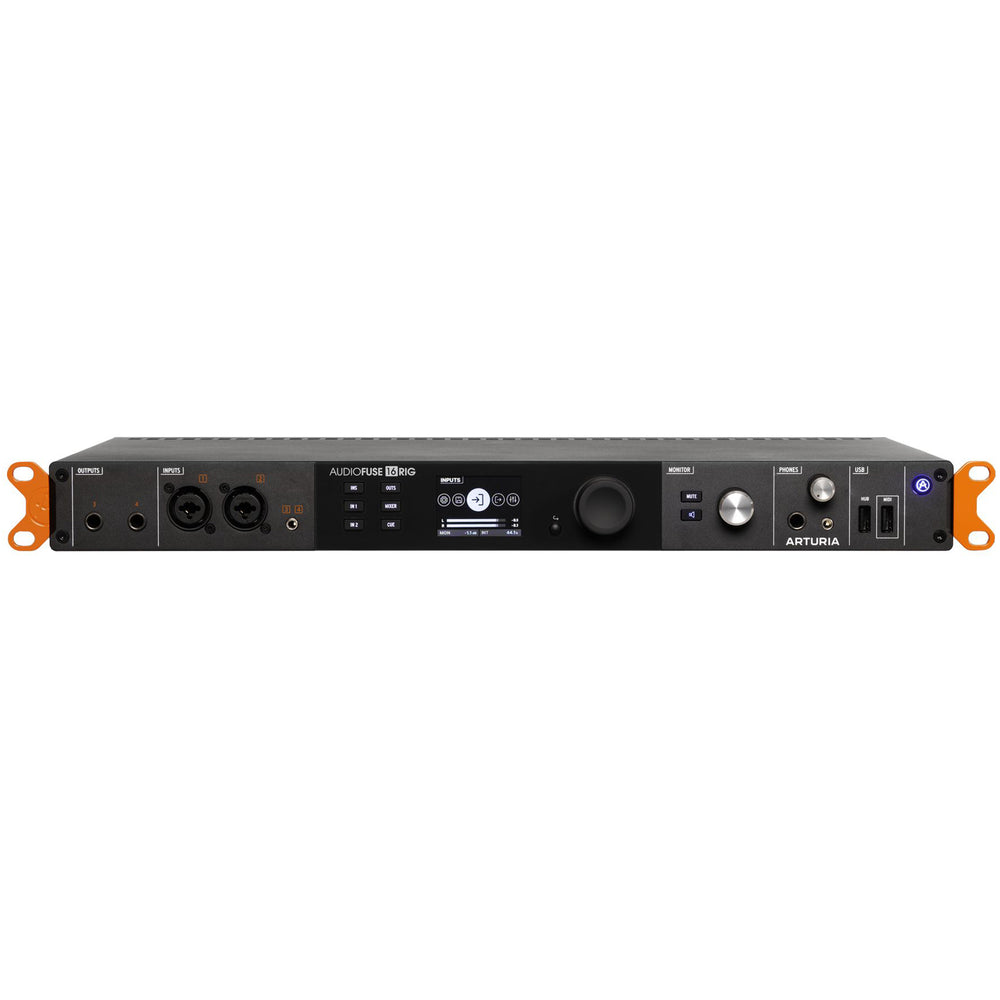
You get 16 balanced analog inputs, including two digitally controlled microphone preamps, plus 12 analog outputs. Eight of those line outputs are DC-coupled, which makes the 16Rig particularly interesting for modular synths, CV-compatible hardware, outboard processing and complex routing.
ADAT can add up to another 16 channels of digital I/O at 48 kHz, while Word Clock, MIDI and USB connectivity make it easier to keep a larger hardware system synchronized.
There is another feature here that electronic musicians should not overlook: standalone operation. The AudioFuse 16Rig includes internal mixers and can route audio and MIDI without a computer connected, making it particularly useful for DAWless jamming, rehearsals or live performance.
MIDI I/O: One 5-pin DIN MIDI input, two 5-pin DIN MIDI outputs/thru, plus a dedicated USB MIDI host port for class-compliant USB MIDI devices. MIDI routing remains available in standalone operation.
Arturia also includes a genuinely useful software bundle. The AudioFuse Creative Suite includes Analog Lab Intro, AudioFuse Control Center and a selection of Arturia studio effects including Pre 1973, Pre V76, Pre TridA, Filter MINI, Chorus JUN-6, Comp FET-76, Delay TAPE-201, Rev PLATE-140, Phaser BI-TRON and Comp DIODE-609.
Analog Lab Intro is a particularly nice bonus if you are building a production setup from scratch. You are not just buying physical I/O. You are also getting access to a large software instrument ecosystem and a collection of useful recording and mixing effects.
Best for: hardware synthesizer collections, electronic musicians, DAWless studios, modular systems and studios where keeping everything permanently connected matters.
Explore the Arturia AudioFuse 16Rig at Moog Audio →
6. SSL 18: Best Expandable Rack Audio Interface for a Growing Studio

The SSL 18 is one of those interfaces that makes you stop and look at the feature list again after seeing the price.
Eight SSL-designed mic and line preamps. Ten balanced line outputs. Two independent headphone outputs. Sixteen channels of ADAT. S/PDIF. Word Clock. Talkback. 32-bit / 192 kHz conversion.
And then there is the SSL part.
Each preamp includes selectable Legacy 4K analogue enhancement, adding harmonic character and a musical high-frequency lift inspired by SSL's 4000-series consoles.
For an electronic producer, the ten line outputs and DC-coupled output capability are particularly useful. This is the kind of interface that can sit at the centre of synths, drum machines, modular equipment, hardware effects and outboard processing without running out of routing options immediately.
MIDI I/O: One MIDI input and one MIDI output via 3.5 mm TRS Type A connections.
Honestly, the feature-to-price ratio here is a little wild. Those preamps are juicy, the routing is serious, and you get a lot of studio before crossing into flagship-interface money.
Best for: hardware-heavy studios, multi-mic recording, outboard processing and producers who want a large expandable USB-C interface.
Explore the SSL 18 at Moog Audio →
7. RME Fireface UFX III: Best Professional Audio Interface for Large Multichannel Studios
Personal disclosure: I love RME!
You will find RME systems in professional studios, universities, production facilities and complex creative technology setups for a reason. Their interfaces are built around deep routing, low-latency operation, long-term driver support and the kind of engineering that becomes increasingly important as a system gets larger.
And the preamps and AD/DA conversion are, frankly, drool-worthy.
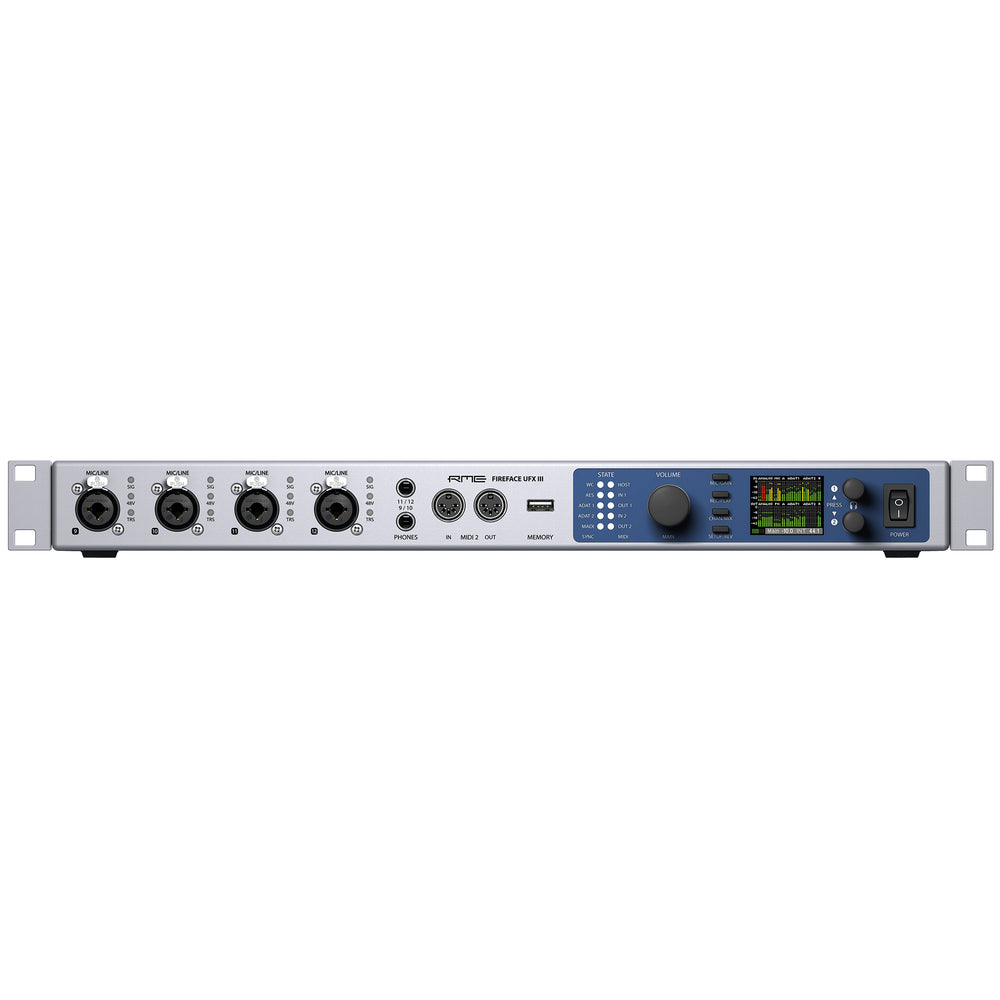
The Fireface UFX III is RME's multichannel flagship, supporting up to 94 channels of input and 94 channels of output through a combination of analog I/O, dual ADAT, AES and 64-channel MADI.
It includes TotalMix FX, RME's extremely flexible DSP routing and mixing environment, along with Direct USB Recording for recording selected channels directly to connected USB storage.
All line-level outputs are DC-coupled, making the UFX III particularly interesting for modular synthesizers and CV/Gate applications as well.
MIDI I/O: Two independent MIDI inputs and two MIDI outputs via 5-pin DIN, with additional MIDI transmission possible through MADI.
RME has an especially strong reputation among PC users because the company develops its own interface core and driver technology. That does not make it a Windows-only choice. The UFX III also supports macOS and class-compliant USB 3 operation.
There is, however, one tiny problem.
It is $4,525 CAD.
I love RME. Yet, I do know that not every budget will allow for this type of expansion!
That is exactly why the rest of this list exists. You may want RME-level flexibility eventually without needing a 94-channel professional flagship today. An SSL 18, AudioFuse 16Rig, MOTU UltraLite mk5 or smaller desktop interface may solve the actual problem in front of you for considerably less money.
Best for: professional studios, complex routing, multichannel recording, installation environments, large hardware systems and producers building a long-term studio around one central interface.
Explore the RME Fireface UFX III at Moog Audio →
What Is the Best Audio Interface for a Home Studio?
If you mainly record vocals, guitar or one synthesizer at a time, two good inputs may be more useful than paying for a large interface you will never fill.
The SSL 2+ MKII is our compact pick here because it combines two high-quality preamps with flexible monitoring, four outputs, traditional MIDI I/O and SSL's optional Legacy 4K character.
If your home studio also includes streaming, video or collaborative content creation, the Yamaha URX22 or Universal Audio Volt Max add broader workflow tools without immediately moving into a rack system.
If your “home studio” actually contains eight synthesizers, three drum machines and a patchbay, congratulations: you no longer have a small home studio problem. Start looking at the UltraLite mk5, AudioFuse 16Rig, SSL 18 or expandable RME systems.
What Is the Best Audio Interface for Synths?
Synthesizer-heavy setups have slightly different priorities from vocal recording studios.
You may need fewer microphone preamps but considerably more line inputs. Stereo instruments use two channels each, and a collection of synthesizers can consume eight inputs surprisingly quickly.
Large output counts also become useful if you send audio through pedals, hardware effects, modular equipment or external mixers.
MIDI connectivity can matter here too. If you use older synthesizers, drum machines or sequencers with 5-pin DIN MIDI, choosing an interface with physical MIDI I/O can remove the need for a separate MIDI interface.
For these setups, the MOTU UltraLite mk5, Arturia AudioFuse 16Rig and SSL 18 are particularly interesting because they combine substantial analog I/O, MIDI connectivity, digital expansion and flexible routing.
If you are still building the instrument side of your studio, see our guide to synthesizers for beginners.
Does 32-Bit Audio Automatically Make an Interface Better?
No.
Bit depth is one part of the signal chain, but it should not be used as the only measure of audio quality.
Converter design, analog circuitry, preamp performance, dynamic range, driver stability, latency, monitoring features and the quality of the entire signal path all matter.
A well-designed 24-bit professional interface can still be the better tool for a particular studio than a 32-bit interface with the wrong I/O or workflow.
Can I Use an Audio Interface for Live Performance?
Yes, but live performance changes the priorities.
For a studio, you may care most about conversion, preamps and connectivity. For a live rig, compact size, reliable drivers, standalone routing, MIDI connectivity, fast recovery and flexible outputs can become just as important.
The MOTU UltraLite mk5 is particularly useful when you want one compact interface to move between studio and live use. The AudioFuse 16Rig adds standalone audio and MIDI routing for larger hardware systems, while RME systems offer extremely deep routing for more complex professional setups.
The Best Audio Interface Is the One That Fits Your Studio
It is easy to get hypnotized by converter specs, preamp counts and giant I/O numbers.
Start with the studio you actually have.
How many microphones do you record at once? How many stereo instruments need permanent connections? Do you need traditional MIDI I/O? Do you use outboard effects? Do you want multiple monitor pairs? Will you need ADAT expansion later? Are you working entirely in a home studio, or does the interface need to travel to performances too?
And remember: you do not have to buy the biggest interface in a product family to get into that brand's workflow. If one of the larger systems in this guide appeals to you but you only need one or two recording channels, look at the smaller models from the same manufacturer. For many producers, a great compact interface is the smarter purchase.
Answer those questions first and the enormous world of audio interfaces becomes much easier to navigate.
You can browse the complete audio interface collection at Moog Audio →
Still Not sure which audio interface is right for your studio?
If you are in Montreal, visit Moog Audio on Saint-Laurent and talk through your setup with our team. Bring a list of the microphones, synths, drum machines, monitors and other hardware you want connected. You can also call (514) 284-7434 to check current store availability before visiting.